Learning / Workshop 1 — Singapore
Personal AI Workflows for Real Life
Turn recurring life-admin mess into a reusable AI workflow in 2 hours.
A small, hands-on workshop in Singapore. You'll leave with one workflow set up for a real task you actually do — meal planning, school logistics, study support, hobby learning, travel research, or whatever keeps eating your weekends.
No coding. No setup. Bring your laptop and one annoying recurring task.
September · booking open
From the June workshop
What people built & said
“It helped me think of ways to use AI to smoothen my personal life, not just my work life.”Workshop 1 participant
“Well-paced even for people like me who have used AI but aren't optimising it yet. Loved the examples. An efficient session — and appropriate for busy parents.”Elysia · busy parent
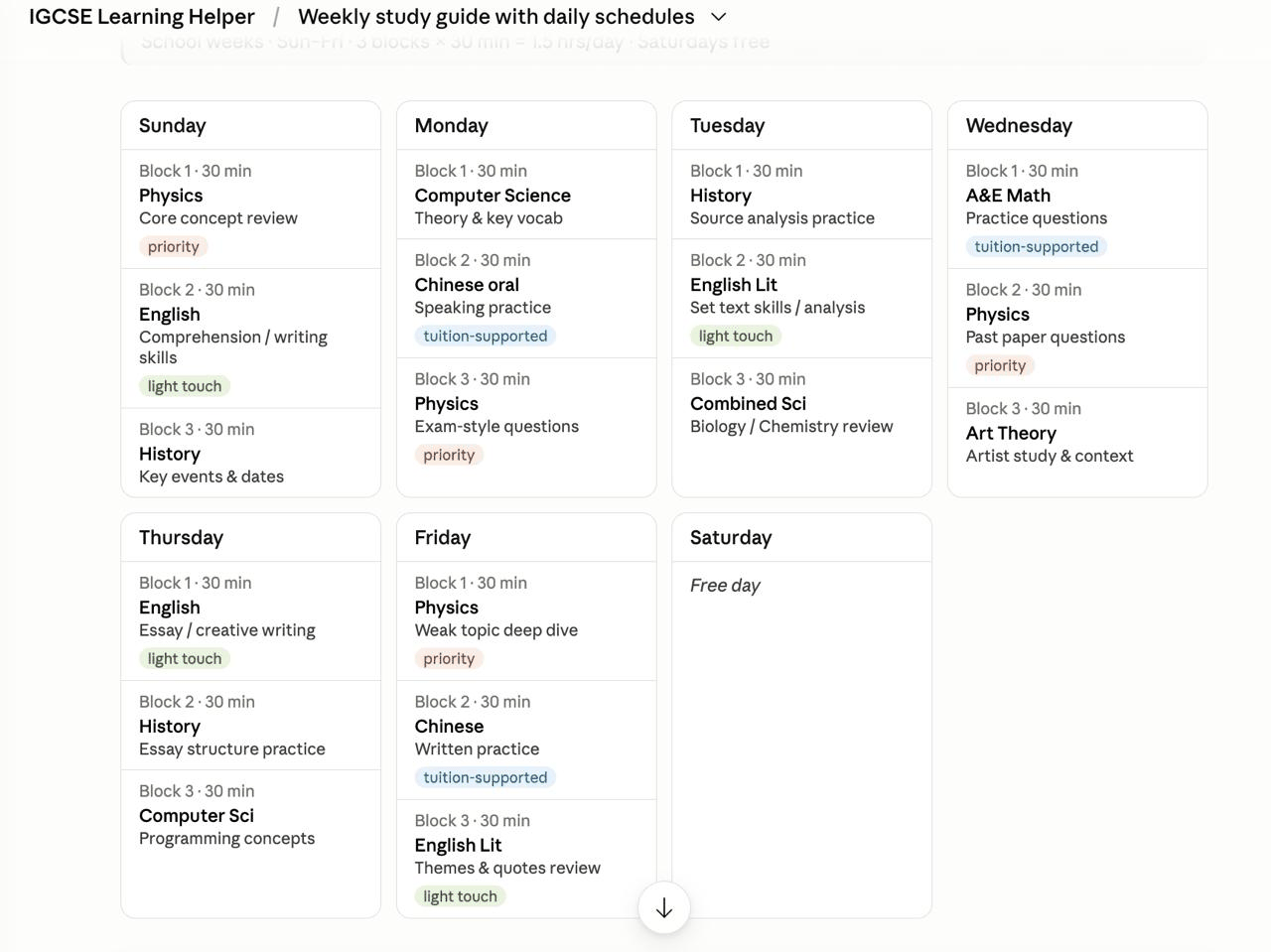
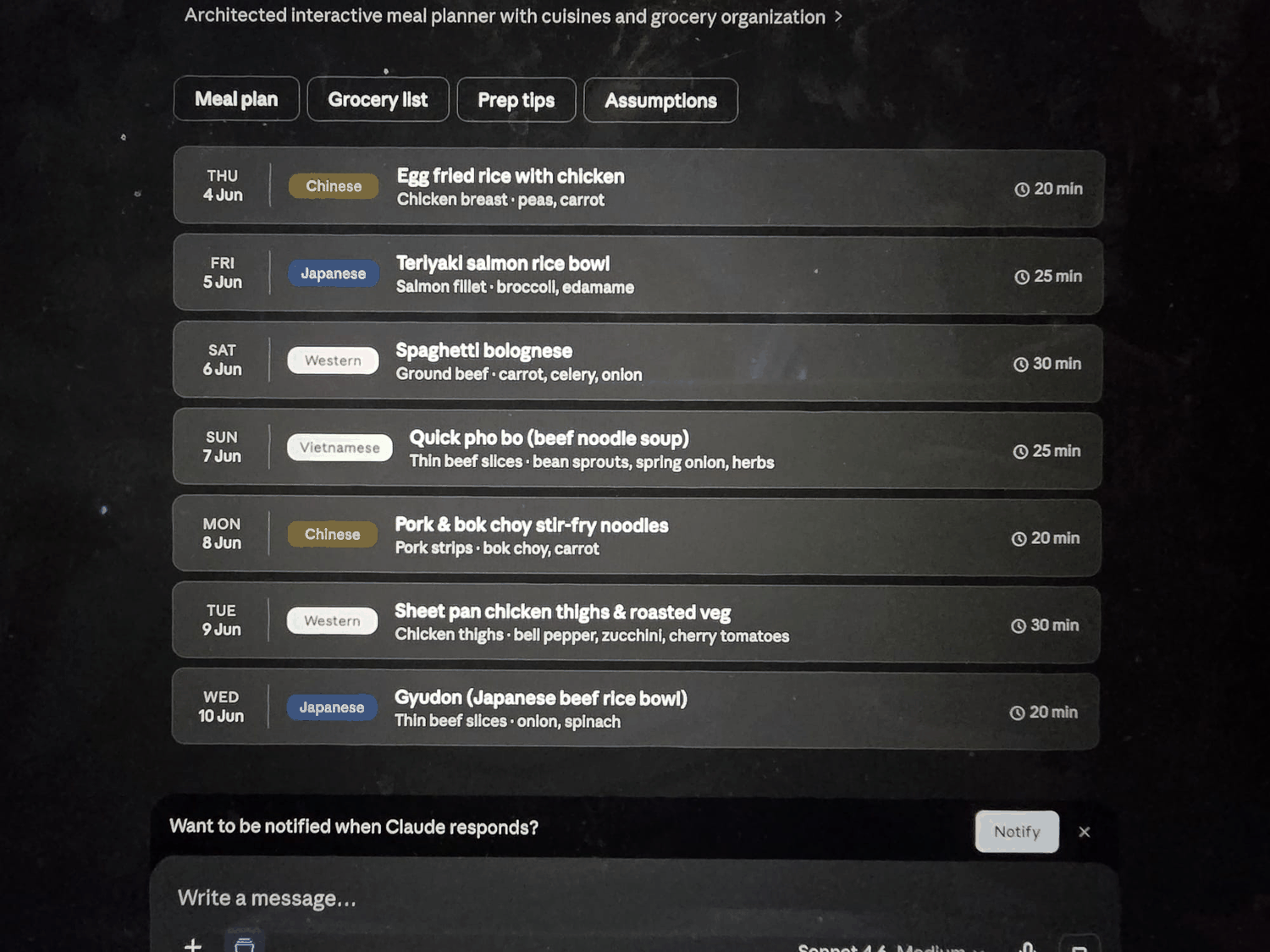
Outcomes
What you'll leave with
- One working AI workflow set up for a real recurring task in your life
- A reusable template you can apply to the next ten tasks
- A clear mental model for when AI fits — and when it doesn't
- A safety checklist so you know what to review and keep under your control
- Slides + templates shared after the workshop
- Access to a small alumni group chat for ongoing questions
Why this exists
Why this exists
Most people already have ChatGPT, Claude, or Gemini open in a tab. The difference between "asking it occasional questions" and "having a workflow that actually saves you time every week" is structure — and that structure isn't intuitive on your own.
A few neighbours started asking how I'd set up AI workflows for the everyday life stuff. This workshop is the answer, in 2 hours, with you actually building one before you leave.
For most people, Workshop 1 is enough: a reusable workflow you can use every week, no terminal, no API keys, no automation headaches.
Fit check
Who this is for
This workshop is for you if
- You're a parent, professional, or just someone whose life admin keeps spilling over
- You've used ChatGPT/Claude/Gemini occasionally but never made them part of your routine
- You want AI to help with the stuff you actually do every week
- You want a structured way to know "is this a job for AI, or not?"
Skip this workshop if
- You want a private bot you can message — one that keeps its own context across messages, can check back later, and can connect to tools later. That's Workshop 2 →.
- You want the theory: prompt engineering, model architectures, evaluation methods. We won't go there.
- You want a hands-off automation. We keep humans in the loop on purpose.
Curriculum
What we'll cover
The mental model
What separates a good AI task from a good app task — and why some experiments stall when the task and tool do not fit.
Three worked examples
Meal planning, school logistics, and an adult learning / study coach. You'll see real messy inputs become useful outputs. Three more examples (curiosity projects, quiz coaching, hobby learning) come with the take-home materials.
Live demo
We'll build one workflow from scratch together. Watch every click.
You build yours
Pick your task, fill the template, test with one real messy input. I'll help individually.
Common failure modes
Common sticking points, how to describe what went wrong, and practical fixes.
Make it last
How to save your workflow as a Project / Custom GPT / Gem so it's there every week.
Your instructor
About your instructor
Oanh founded Paper & Pixel, a Singapore applied AI studio making AI useful, understandable, and safe for real life and small business. Its work spans practical products such as StencilCV and Zesca, hands-on learning, and tailored solutions for small and medium businesses.
Her background includes Google, McKinsey, and Intuit. In the workshop, the emphasis is practical: try a useful workflow, review the result, improve it, and keep people in control.
Logistics
Logistics
September 2026 — S$65
Includes:
- 2-hour workshop
- Light refreshments (coffee, tea, snacks)
- Slides + starter template shared after the workshop
- Access to the alumni group chat
What to bring:
- Laptop and charger
- Access to ChatGPT, Claude, or Gemini (free tiers are fine)
- One recurring admin task you'd like help with
FAQ
FAQ
Do I need to know anything about AI?
Nope. If you've used ChatGPT once, you're ready.
Which AI tool will we use?
I'll demo in Claude, but everything works in ChatGPT and Gemini. Use whichever you already have.
Do I need a paid AI subscription?
Free tiers are fine for the workshop. I'll briefly mention what paid gets you.
What if I'm not great at tech?
You're exactly who this is for. The room is 10 people max and I'll help you individually.
Does this set up automation?
No. Workshop 1 does not connect to your calendar, send messages, update spreadsheets, or run in the background. You'll build a reusable AI workflow you control manually.
Is it okay to use real emails, school messages, or screenshots?
Yes, but use judgement. Redact sensitive details where possible — names, phone numbers, addresses, passport/NRIC numbers, payment details, medical information, and confidential work/customer data. AI is useful for structuring messy information, but you should verify dates, amounts, instructions, and anything involving children before acting.
Can I bring my partner / friend?
Yes! Each person needs their own ticket so we can keep the group size manageable.
Can I bring my child or teen?
The workshop is designed for adults, though some examples cover school and study support. If you'd like to bring a child or teen, they'll need to be comfortable sitting through an adult-paced hands-on session for 2 hours. Drop me a note before booking and we'll figure it out.
Will the workshop be recorded?
No. The hands-on time is the value, and recording makes people self-conscious. You'll get the slides and templates.
Refund policy?
Refundable when requested at least 7 calendar days before the workshop. Before the session, you may also transfer your place to someone else. See the Returns & Refund Policy.
Should I take Workshop 1 or Workshop 2?
Take Workshop 1 if you want reusable AI workflows with no setup, no APIs, and no bot. Take Workshop 2 if you already have a recurring personal job that benefits from a private bot you can message, and you're willing to do a guided technical setup.
When's Workshop 2?
Workshop 2 runs Monday 21 September 2026, 6:00–9:00pm. It covers building a private bot you can message, running on your own Google Cloud VM with Codex doing the setup. More technical, max 5 people per group, S$165. See Workshop 2 →.
Do you offer custom builds for my business?
Yes — see AI solutions for small and medium businesses → if you want help mapping a real workflow and building around your context, rules, and tools.
Ready to build your first workflow?
Bring one recurring life-admin task. Leave with a working workflow you can reuse the very next week.
Questions? Email hello@paperandpixel.studio